
In this blog i am going to share some very common functions used in dyamics 365.After the deprecation of javascript utilities like Xrm.Page all the javascript implementations needs to be updated with executioncontext .I will demonstrate first example in brief to explain you how to use these functions .Lets discuss these functions one by one below.
- Get Value of an attribute GetValue()
function GetValue(formContext, formAttr) {
        try {
            return formContext.getAttribute(formAttr).getValue();
        } catch (e) {
            Alert(e.message + " - " + formAttr);
            return null;
        }
    }
The above function takes two input parameters formcontext and formAttr . Formcontext is executionContext.getFormContext(); where executioncontext is the passed parameter on function call.As shown in below screenshot check the execution context flag.
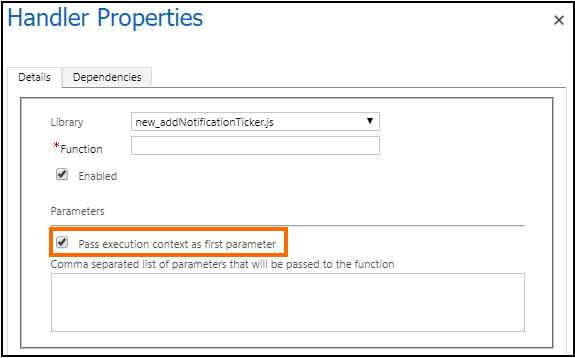
function performsomeaction(executionContext) {
var formContext = executionContext.getFormContext();
var namevalue=Getvalue(formContext,"formAttr");
// logic to lock fields on the basis of value
}
In the above code i have demonstrated the use of Getvalue function in performsomeaction function. This will return us the value of the attribute passed.
2.Set Value of an attribute SetValue()
 function SetValue(formContext, formAttr, value) {
        try {
            formContext.getAttribute(formAttr).setValue(value);
        }
        catch (e) {
            Alert(e.message + " - " + formAttr);
        }
    }
The above function takes three input parameters formcontext ,formAttr same as the first function and value contains value to be set for the given attribute. This function will set the value of the atribute as per the value provided in the parameter.This is not used for lookup values as lookup values takes array as an input.
3. Set value of a Lookup SetLookupValue()
function SetLookupValue(formcontext, fieldName, id, name, entityType) {
             if (fieldName != null) {
            if (id.indexOf('{') === -1)
                id = '{' + id;
            if (id.indexOf('}') === -1)
                id = id + '}';
            id = id.toUpperCase();
            var lookupValue = new Array();
            lookupValue[0] = new Object();
            lookupValue[0] = {};
            lookupValue[0].id = id;
            lookupValue[0].name = name;
            lookupValue[0].entityType = entityType;

            formcontext.getAttribute(fieldName).setValue(lookupValue);

        }
The above function takes 5 input parameters that is formcontext,fieldname,id,name and entitytype. First two parameters are common as above where as id is the lookup record guid to set,name is the name of the lookup record with corresponding id and entitytype is the name of entity of which the lookup record belongs to. SetLookupValue(formcontext,”lookupname”,GUIDoftherecord,”Record name”,Testentity);
4.Set filter to a Lookup Addfilter()
function Addfilter(formContext, fetchquery, formAttr) {
        try {
            formContext.getControl(formAttr).addCustomFilter(fetchquery);
        } catch (e) {

            Alert(e.message + " - " + formAttr);
        }

    }
The above function takes 3 input parameters formcontext,formAttr and fetchquery.
Formcontext and formattr are the common parameters that is the executioncontext and attribute name where as fetchquery is the filter condition for that lookup.
5.Hide / Show Field HideShowField()
function HideShowField(formContext, formAttr, bool) {
            try {
                formContext.getControl(formAttr).setVisible(bool);
            }
            catch (e) {
                Alert(e.message + " - " + formAttr);
            }
        }
The above function is used to hide or show a particular field. It takes 3 input parameters
formcontext,formAttr and bool . The first 2 parameters are common parameters where as bool is the true or false value used to hide or show the attribute. Pass true in case you want to show a hidden field and pass false if you want to hide a field.
6.Hide or Show Section HideShowSection()
 function HideShowSection(formContext, section, tab, bool) {
        try {
            formContext.ui.tabs.get(tab).sections.get(section).setVisible(bool);
        }
        catch (e) {
            Alert(e.message + " - " + section);
        }
    }
The above function is used to hide or show a section on the form.It takes 4 input parameters formContext which is the formcontext ,section is the name of the section,tab is the name of the tab under which the section is and bool has true or false.If you want to hide the section you can pass false and and if you want to make the section visible you can pass true. HideShowSection(formContext, sectionname, tabname, true) will be used to hide .
7.Hide or Show Tab hideshowtab()
function hideshowtab(formContext, tab, bool) {
        try {
            formContext.ui.tabs.get(tab).setVisible(bool);
        }
        catch (e) {
            Alert(e.message + " - " + section);
        }
    },
The above function is used to hide a tab on form. It takes 3 input parameters fromcontext, tab which will be the name of the tab and bool that is true or false.
8.Lock Unlock Fields Lockfields()
function Lockfields(formContext, fieldAttr, bool) {
        try {
            formContext.ui.controls.get(fieldAttr).setDisabled(bool);
        }
        catch (e) {
            Alert(e.message + " - " + fieldAttr);
        }

    }
The above function is used to lock or unlock fields on form.It takes 3 input parameters formcontext, fieldAttr and bool which will be the true or false.Use true to lock the fields and false to unlock the fields.
9.Set fields Mandatory/Non Mandatory
  function setrequiredlevel(formContext, formAttr, level) {
        try {
            formContext.getAttribute(formAttr).setRequiredLevel(level);
        }
        catch (e) {
            Alert(e.message + " - " + formAttr);
        }

    }
The Above function is used to set the requiredlevel of the field.It takes 3 parameters as input formcontext,formAttr and level where level can be as below three –
- none – It is used to set a field non mandatory
- required-It is used to set a field mandatory
- recommended-It is used to set a field business recommended
You can use the above parameters in level to set the required level of the field.
10.Alert function Alert()
Alert(displayMessage) {
        Xrm.Navigation.openAlertDialog(
            {
                confirmButtonLabel: "OK",
                text: displayMessage
            },
            {
                height: 150,
                width: 300
            });
    }
The above function is used for Alert Pop . It takes on input parameter displayMessage which is the message which is to be displayed.
As you can see all the functions above i have used this Alert function in catch block for exception.
The above function can used in one global javascript file and can be used in all the forms as per your requirement.
Hope this helps you and Thank you for reading ……………. 🙂
You can connect me on LinkedIn.
 Rey Dynamics CRM Blog
Thanks, helpful article.
LikeLiked by 1 person