
In the latest release of microsoft Wave 1 for Dynamics 365 ,one of the many feature which we are going to discuss today is open Form using below command Xrm.Navigation.navigateTo(pageInput,navigationOptions).then(successCallback,errorCallback).
We can use the modal pop up to provide a better user experience where the client can navigate to another form without leaving the current form. We can populate entity list view, entity record forms as well as a web resource. Further details are provided for every page input as per Microsoft Docs below.
Types of Page Input
1.EntityList
- pageType: String. Specify “entitylist”.
- entityName: String. The logical name of the entity to load in the list control.
- viewId: (Optional) String. The ID of the view to load. If you don’t specify it, navigates to the default main view for the entity.
- viewType: (Optional) String. Type of view to load. Specify “savedquery” or “userquery”.
2.Entity record
- pageType: String. Specify “entityrecord”.
- entityName: String. Logical name of the entity to display the form for.
- entityId: (Optional) String. ID of the entity record to display the form for. If you don’t specify this value, the form will be opened in create mode.
- createFromEntity: (Optional) Lookup. Designates a record that will provide default values based on mapped attribute values. The lookup object has the following String properties:
entityType,id, andname(optional). - data: (Optional) Object. A dictionary object that passes extra parameters to the form. Invalid parameters will cause an error.
For information about passing parameters to a form, see Set field values using parameters passed to a form and Configure a form to accept custom querystring parameters. - formId: (Optional) String. ID of the form instance to be displayed.
- isCrossEntityNavigate: (Optional) Boolean. Indicates whether the form is navigated to from a different entity using cross-entity business process flow.
- isOfflineSyncError: (Optional) Boolean. Indicates whether there are any offline sync errors.
- processId: (Optional) String. ID of the business process to be displayed on the form.
- processInstanceId: (Optional) String. ID of the business process instance to be displayed on the form.
- relationship: (Optional) Object. Define a relationship object to display the related records on the form. The object has the following attributes.
3.HTML web resource
- pageType: String. Specify “webresource”.
- webresourceName: String. The name of the web resource to load.
- data: (Optional) String. The data to pass to the web resource.
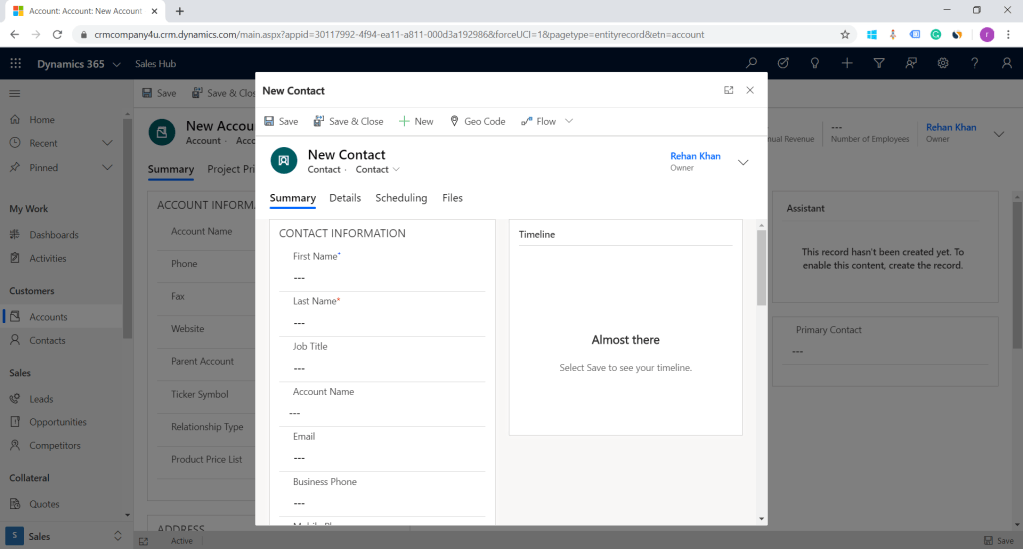
To demonstrate this command i am adding a new button on Accounts form ribbon called new contact as seen in below image.
Xrm.Navigation.navigateTo({
pageType:"entityrecord",
 entityName:"contact",
 formType:2},

{target: 2,
position: 1,
 width: {value: 50, unit:"%"}
});
In the above example i have demonstrated page type entity record.
target: Number. Specify 1 to open the page inline; 2 to open the page in a dialog. Also, rest of the attributes (width, height, and position) are valid only if you have specified 2 in this attribute (open page in a dialog).
position: (Optional) Number. Specify 1 to open the dialog in center; 2 to open the dialog on the side. Default is 1 (center).
width: (Optional) Number or Object. The width of dialog. To specify the width in pixels, just type a numeric value. To specify the width in percentage, specify an object of type SizeValue
height: (Optional) Number or Object. The height of dialog. To specify the height in pixels, just type a numeric value. To specify the width in percentage, specify an object of type SizeValue with the following properties for height and width:
value: Number. The numerical value.
unit: String. The unit of measurement. Specify “%” or “px”. Default value is “px”.
This feature will surely be used by many of our clients ,to enhance user experience .
I Hope this helps.
Thanks for reading Good Luck…………. 🙂
You can connect me on LinkedIn.
 Rey Dynamics CRM Blog